|
|
Spring Time at AtHomeNet
Welcome to this edition of the AtHomeNet Gazette; a publication dedicated to helping you utilize your AtHomeNet website to take your communities to the next level. The Gazette is your monthly source for all things AtHomeNet. If you want to print this edition of the AtHomeNet Gazette, click here: Print the Gazette
The AtHomeNet team has a lot in the works; the Spring release of AtHomeNet Elite, Training Camp 2009 preparations, and a new partnership with a nationally respected Search Engine Optimization Firm. Check out Inside AtHomeNet for all the details, as well as this month's new enhancements in 'What's New". With a new year just getting going, you can always get an Inspire Session to give your website fresh new pizzazz, followed by an SEO Inspire Session so everyone will see that great newly spruced up website!
We hope you enjoy the February 2009 AtHomeNet Gazette.
[ Back to Top ]
WHAT'S NEW
New Features & Enhancements February 2009
- Modules - Search Engine Optimization Enhancement- When you create a Module, you can now add customized Meta Description and Meta Keyword tags on every level of the Module pages in order to allow for more detailed Search Engine Optimization of pages.
- User Profile Enhancement: Administrators can opt to turn off the new Subscriptions and My Documents tabs in the user profile. Contact [email protected] if you wish to have these tabs disabled on your website.
- Task Manager Enhancement- There is now an item count for each tab on the Task Manager screen to show total number of tasks by status: Open, Closed Pending, Closed, and Hold
- Login Request Enhancement- There is now an item count to each tab on the Login Request screen to show total number of login requests by status: Pending, Approved, Denied and Cancelled
- Website Settings Enhancement- Reorganized the Administrator Settings page to group settings by feature
- Email Bulletins Enhancement- You now have the option of turning off the "Send Login and Password with eMail Bulletin" option when sending a new email bulletin
- Address Book Report Enhancement- Custom "Miscellaneous" and "Administrative" fields from the User Profile are now separated out in the Address Book Report and Export features
- eMail Bulletins Enhancement- Administrators can now unsubscribe individual people from the regular Message Board and the "Board" Message Boards
- eMail Bulletins Enhancement- Administrator can now "unsubscribe" people from getting eMail Bulletins sent to "All" to avoid being marked as SPAM
- New eMail Bulletin Templates – There are 5 new eMail Bulletin Templates. Enjoy!
- Two Easter Newsletter Themed
- One Woods/ Mountain Theme
- One "Notes From Management"
- One "What’s New on the Website"
- Admin Settings Editing Enhancement- New admin settings that allow you to customize your website:
- Require Agreement with Terms to Login? - Determine whether or not residents are required to agree to a "terms of service" before logging into the private area of the website
- Require to Residents to Verify Residency on Login Request: Determine if you will require a person submitting login request form to verify that they are a resident of the community
- Automatically Match Email Address in Login Request Form: Determine if login requests that match a known email address are automatically matched and replied to without having to have an administrator approve them
- Ask for Address?: Decide if you want to ask residents for their primary address on the login request form
- Ask for Unit/Lot#?: Decide if you want to ask residents for their unit/lot numbers on the login request form
- Photo Albums – Add, Edit, Delete Security Level – Control the security level assigned for adding, editing and deleting information in Photo Albums
- Save eMail Bulletins for ALL to Announcements Category?: Determine if email bulletins sent to ALL are automatically saved in Announcements under "Recent Email Bulletins"
- Number of days to save Email Bulletins for ALL?: Determine how many days the email bulletins sent to ALL appear under the "Recent Email Bulletins" Announcement category
- 212 (TOPS) Board Reports Enhancements: Reports are now sorted by Date Printed
- Check Out the What's New February 2009 Video which covers all the new Website Enhancements
[ Back to Top ]
Come Join The Elite...
We know you've been patiently awaiting getting your mouse arrows clicking around the new AtHomeNet Elite websites. Well though the official release is coming up this Spring, for those of you who have been blossoming with anticipation, we have a special preview post valentines day treat for you.
AtHomeNet has released a BETA Elite Demo community website exclusively for our existing clients to explore and provide feedback. With Elite's release date of April 1st, we wanted to give you special access to familiarize yourself with just how Elite works. Please click here to start your Elite Experience today.
If you decide you are ready to sign up for an official conversion from AtHomeNet classic to AtHomeNet elite, visit our Administrator's website at www.AtHomeNet.com/Administrators and go to eforms to make a conversion request, or click here to fill out a Conversion request form.
Have Fun!
[ Back to Top ]
Look What Your Website Can Do Now!
"A new way to keep your residents up to speed" With AtHomeNet rolling out over 400 enhancements last year, we know as an admin it can be difficult to keep your residents informed of how the web site has been enhanced to better meet their needs. So in 2009 we will be picking some of our most resident friendly features that may get overlooked, and providing you with an email template to announce exactly why from a resident's perspective that they should be excited, not to mention walking them through how it works.
This new mini-feature will be a new email template which you can send out from your site every month intended to help you announce to your residents or communities the hottest new features on a monthly basis. The inaugural installment draws from last month's "What's New" releases and features a very "Friendly" new feature.
Every month we will be selecting a brand new feature from our monthly enhancements list for you to share with your community via the "Look what your website can do now!" template.
Happy sending.
[ Back to Top ]
AtHomeNet Training Camp 2009!
Save the Date - Wednesday, September 16, 2009 in Duluth, GA. Join us as we explore a wealth of training and information designed to maximize your web site expertise! As always, AtHomeNet's annual training camp will be filled with information and sessions on the exact topics that interest you! Also, this year 212 Software (TOPS) will be offering a series of Training Classes on TOPSr Software. Stay tuned for further details as the date approaches - including how to sign up!
Get The Full AtHomeNet Family Experience Online!
With 11 years of website excellence under our belt, the AtHomeNet team is putting ourselves out there in 2009. We will be at trade shows, colleges, and other events near you. Just in case you can't see us in person, nobody has to be in the dark though. We've got a lot of ways for you to interact with the AtHomeNet Experience. We want to hear from you, see you, talk to you, and get to know you. So if you're online, it doesn't matter whether you prefer the short but sweet Twitter nation, the pizzazz of MySpace, or the free forum exchange of a Blog, we invite you to join us whenever and wherever.
We want to hear from you today, so the next time you are online, you can keep up with AtHomeNet in a number of ways.
- Follow us on Twitter. If you don't already have a Twitter account, it's free so visit www.Twitter.com and sign up, then look up AtHomeNet and follow us. We'll be releasing information about our travel schedule, upcoming company news, AtHomeNet Elite, and lots of other little great tidbits as they unfold on a day to day basis.
- Visit us on MySpace, MySpace is a great place to mix and mingle with businesses, friends, communities, and people all over the country and a few worldwide. Visit www.Myspace.com/AtHomeNet to view our videos, keep up with our travel schedule, check out press releases, and find new friends in the HOA, Community, Condo and property management industries.
- Join us on Facebook. If you prefer the more laid back, more direct approach of social networking, then you probably already have a Facebook account. Here you can keep up with our press releases, company news, check out photo albums from Training Camp, and more. Visit AtHomeNet Inc. on Facebook by clicking on or copying and pasting the following url. http://www.facebook.com/people/Athomenet-Sanders/1167846207#/pages/Suwanee-GA/AtHomeNet-Inc/43125082431
- Check out our Blog. Want to hear all about AtHomeNet directly from the owners of AtHomeNet? Well the AtHomeNet Blog 360 is the place to do it. Jeff and Susan will be talking about company news, sharing their industry insights, and inviting you to share your thoughts on the world of HOA websites and the world in general. Go to blogs.athomenet.com and see what all the hype is about!
- Watch the AtHomeNet channel on YOU TUBE. Curious to see some of the faces behind the websites? Ever wondered what some of the real millions of residents and Association Managers look like and what they have to say about AtHomeNet? Maybe you happen to be curious as to what the entire staff looks like. You can find the answers to all that and more on AtHomeNet's You Tube channel; where you'll find a growing library of videos both instructional, informative, and fun about all things AtHomeNet. Grab a bowl of popcorn and sit back and visit www.youtube.com/AtHomeNet
[ Back to Top ]
TIPS FROM SUPPORT
Using Your New PayForm Feature! eForms (Electronic Forms) are such a unique feature as they allow the administrator the ability to design specific forms for your community's needs. These forms are filled out online and then immediately emailed to one or more people as designated during set up. The administrator has the option to view/export the data for any submitted form from the website. We've seen forms created for a variety of uses, including Architectural Review Request Forms, Classified Ad Order Form or Clubhouse Reservation Forms. This month we are offering a new, added benefit that provides effective business process management for your community. PayForms now offers the ability to accept a fixed or per unit payment via credit card from within an eForm. No setup fee is required for this added service, just a 7% transaction fee which is added to the amount paid by the buyer. Use them to sell Classified Ad space to Vendors or tickets to your upcoming Valentine's Day Ball at the clubhouse! You decide the fee and the maximum purchase quantity. Getting started is easy!
- Email our Support team to obtain a contract between you and our Credit Card payment provider, AssociationReady
- Complete the contract and fax it back to 770-904-7939
- Support will enable this on your website
- Go to your website and click an existing eforms to allow eForm Payments or click to add a new eForm that you will create for eForm Payments
- Go to the bottom of the edit the form screen, and enter three pieces of information in the "Online Payment Information" section
- Short Item Description (the name of the item you are selling, i.e. Gate Key, Ticket to Valentine's Day Ball)
- Per Unit Amount (the per unit fee associated with the item being sold)
- Maximum Purchase Quantity (the maximum number of items that can be purchased)
- Buyer will see confirmation on screen and by email
- Recipients of the form will receive an email with the payment confirmation code when the payment clears
- A report of submissions, including payment status, can be accessed at any time by clicking the View/Export submitted form link from eForms
[ Back to Top ]
INSIDE AtHomeNet
It's been a busy first part of the year, as the AtHomeNet team prepares for the Spring release of AtHomeNet Elite. Along with welcoming a lot of new friends and residents that are just joining the AtHomeNet family of clients, we also are rolling out the welcome mat for a new partner who you're sure to meet.
AtHomeNet proudly announces our partnership with Search Engine Optimization Firm, Atlanta SEO Works. Many of our clients know the value of Search Engine Optimization and how powerful a tool it can be, particularly for our Association Managers who have a portfolio of properties under their care. Atlanta SEO Works is now AtHomeNet's preferred partner for optimizing the websites of all of our clients, and through our exclusive partnership, they will provide this service to you at a special below-market rate.
Atlanta SEO Works has been a leading Marketing and SEO firm for the past ten years. The firm prides itself on taking a methodical approach to SEO, yielding results driven services to their customers and establishing long term professional relationships. The company started out specializing in Atlanta Search Engine Optimization and then expanded to work with clients nationwide, improving their customers' organic rankings and managing their pay-per-click campaigns.
Atlanta SEO Works president, Sterling Harris commented on the value of adding content to improve organic listings. "Organic Search Engine Optimization is one of the most effective ways for a company to increase market and brand recognition, which translates to generating more revenue. AtHomeNet's strong position in the Professional HOA Management industry is a natural fit for us as a professional partner, and I am very excited to work with their clients on an ongoing basis."
If you would like more information on optimizing your site for Google, Yahoo, and the other major search engines, AtHomeNet offers SEO Inspire Sessions. In The SEO Inspire Session, our Online Marketing team will work with you and analyze your website and walk you through how you can improve your rankings. When you want the job done for you without having to get your staff involved, and your desire is to have your website improve in organic rankings and stay in the top tier at a fraction of the normal cost for professional SEO services; please contact Sales@AtHomeNet and tell us you want to sign up for our discounted SEO partnership pricing plan with Atlanta SEO works.
+ Back to Top
FREE ONLINE TRAINING FOR NEW ADMINISTRATORS
The AtHomeNet New Administrator Online Training is a FREE web-based training course led by a live instructor which offers AtHomeNet clients an introduction to understanding their role as the Web Site Administrator. Attendees will explore some of the basic procedures needed to be a successful website administrator as well as receive instruction on how to properly update their web site with content necessary to promote resident use.
This course is offered at no charge every 2nd and 3rd Wednesday of the month at 2:00 PM (EST). Users connect to the class via telephone and Internet conference software (WebEx). This allows each user to see exactly what our instructor is doing on his or her computer using an AtHomeNet demo community website. Each course lasts about an hour and includes a question and answer period at the completion of the course.
Please take advantage of these free classes, as we are considering offering other topics based on the response we see from this one.
Register now, classes are limited to the first 25 registered applicants. Additional applications will be scheduled for a later session.
>> Click to Register! it's FREE!
MANAGER'S CORNER
Do more with BuyDocs
With spring and summer just around the corner, people will be wanting to gain access to the pool. This means people need keys and tags. This also means an increase in traffic to your offices for these items. To help address this increase in demand, you can use the BuyDocs feature to solve this problem. Use the BuyDocs feature as an online store for residents to request items such as pool keys, pool tags, gate clickers, or any other item residents normally come to the office to obtain. Using the BuyDocs online store allows for residents to request the item, pay for it online with a credit card, and receive the item in the mail. On the management end, you would receive an email stating the name and address of the resident that has ordered and paid for the item. This helps to eliminate some of the walk ins and visits by residents, freeing up time for managers to keep up to date with the daily tasks of property management. This feature is free with any website plan and can be set up quickly. Be sure to ask your sales representative how you can get started using BuyDocs before the rush comes!
[ Back to Top ]
212 SOFTWARE (TOPS) USER GROUP
Helping to Ensure Successful Community Website Uploads!
Your 212 community website is a uniquely defined website as it incorporates owner information from your 212 software directly to the owner’s Account tab on their community website. Information is automatically uploaded from your 212 software via a daily schedule so information stays up-to-date. We view this as the keystone of your community web site and want to ensure the successful transfer of this owner account information. There are some tips we would like to offer you to assist in this process:
- Identify the W-I-M (Website Integration Manager) at your office. The Website Integration Manager is the person within your company that is responsible for configuring the 212 Website Uploads for your communities. Essentially, this person will perform the initial data upload from 212 to the community's web site and add the communities to the 212 Website Scheduler so that the data uploads happen automatically at a specific time.
- Keep your 212 software files up-to-date! The 212 Internet Updater is one of the most important tools in your arsenal. As such, you should run the Updater via a scheduled task to keep current. This ensures that your local version of 212 software matches the most recent version from 212’s Software Internet Server.
- Ensure that the 212 Website Scheduler is set up to run nightly. Check your 212 Website Scheduler to ensure that you have defined a website upload task to happen nightly each day of the week after your office is closed. Suggested times are between 10PM EST and 2AM EST.
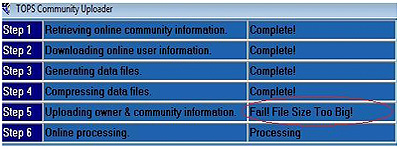
- Be sure to check the 212 Community Uploader progression screen for possible issues or errors. If the uploader was not successful in transferring files, it will be important to note which steps of the upload caused the failure. See screenshot as an example. This information should be immediately sent to our Web Support team for resolution.
[ Back to Top ]
THANK YOU!
Thank you for being a loyal AtHomeNet family member. We will continue to provide you valuable information and announcements about exciting new changes in the months to come!
Sincerely,
The AtHomeNet Team
[ Back to Top ]
|
 |
|
|
|